Originally published 15 July 2025 | Last updated 10 November 2026.
Introduction: The Reporting Mirage in LMS Platforms
Good LMS reporting answers four questions without manual work: who has completed their training, who is overdue, whose certifications are about to expire, and whether you could prove it to an auditor today. If your reports can’t answer those in a few clicks, they’re not doing their job.
Many LMS platforms promise robust reporting in the demo, but once implemented, organisations find they’re limited to basic metrics like completions and logins. That isn’t enough to manage compliance, track skills or show the value of your training.

The Problem with Most LMS Reporting Tools
Many LMS platforms include reporting features, but they often miss the mark where it really counts. They tend to focus on learner completions, offering little meaningful context behind the data. Limited filtering makes it tricky to break things down by role, department, or location, and without real-time insights, it’s hard to step in when it matters most. Add in weak integration with other systems, and you’re left juggling disconnected data. The result? Missed compliance deadlines, overlooked skill gaps, and limited visibility into how well your training is actually working.
What a good LMS report should show
- Completion status by person, team and location
- Overdue training, with the manager responsible
- Certifications and licences that are about to expire
- Completed, overdue and not-started counts for each mandatory topic
- Assessment results, not just completions
- An audit trail of enrolments, completions and content changes
- Scheduled reports emailed to managers automatically
- Access controls, so managers only see their own teams
How Tribal Habits Does It Differently
Tribal Habits offers a comprehensive reporting suite designed to provide actionable insights and support strategic decision-making.
Detailed data tracking
Tribal Habits tracks more than completions. It records quiz answers, survey responses, written reflections and on-the-job task outcomes, along with certificate expiry, version completions and assessment attempts. Internal and external training count towards CPD goals in points or minutes. On Business plans, role assignments and skill attainment also show how competency develops over time.

Advanced Filtering and Customisation
Administrators can filter reports by training status (completed, in progress, overdue or expired), by timeframe or reporting period, and by any custom user field, such as location, team or job title. On Business plans, reports can also be segmented by groups for custom-defined cohorts. Filters can be saved and reused.
Diverse Reporting Options
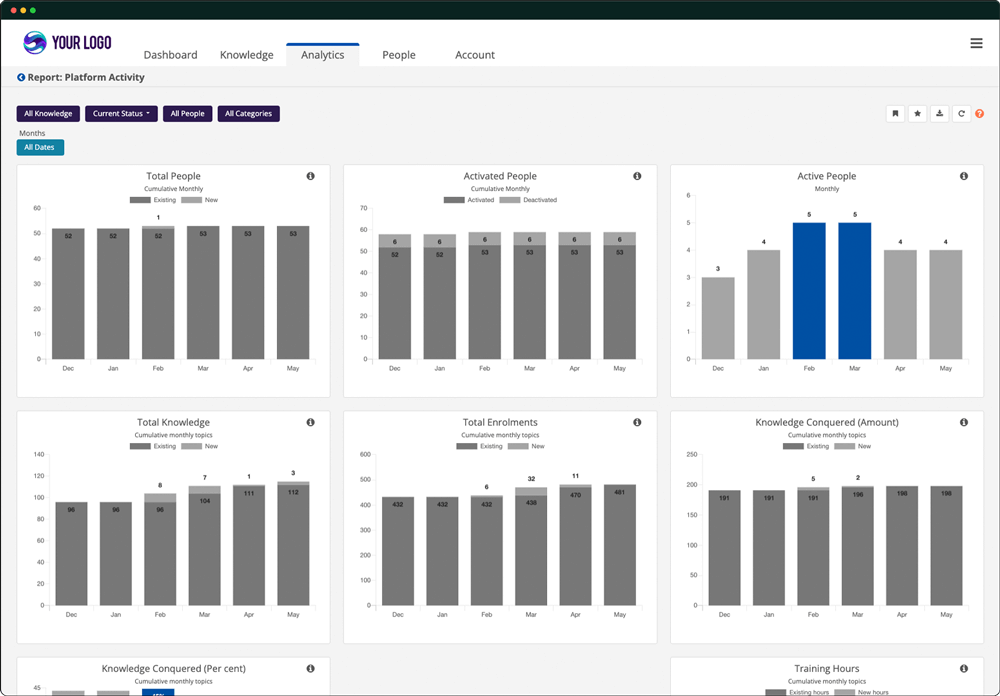
Tribal Habits provides a suite of reports for different needs. People reports show each person’s training status, while Results reports show enrolments, completions and assessment results by topic. Certification reports track who is current, who is due and who has expired. Goals reports track CPD and other targets, Platform reports show overall activity, and Contributions reports capture learner inputs such as quiz answers and task submissions. Settings reports show how each topic and pathway is set up, including notifications, versions, assessment settings and enrolment rules. On Business plans, Roles and Skills reports also show competency progress. Every report can be filtered, saved, exported and scheduled to be emailed to managers.
Integration with External Systems
On Business 50+ plans, managed integrations are available as an add-on with HR and payroll systems including Employment Hero, Humanforce, foundU and EmployeeConnect. New starters, leavers and changes to job title, location and manager flow into the LMS automatically, so your reports stay accurate.
Real-World Impact
In practice, the biggest change is visibility. Instead of chasing completions through spreadsheets and emails, administrators see who is overdue, whose certifications are expiring and which teams are falling behind, and can follow up before a deadline is missed. Scheduled reports put the same view in managers’ inboxes, so follow-ups happen without the training team chasing them.

Questions to ask in an LMS demo
- Show me everyone who is overdue on a compliance topic, filtered by team.
- Show me which certifications expire next month.
- Can managers receive their team’s report automatically each week?
- Can you export a report I could hand straight to an auditor?
- Can team leaders see only their own team’s results?
Key Takeaway
Good LMS reporting should answer four questions in a few clicks: who’s completed, who’s overdue, whose certifications are expiring, and whether you could prove it to an auditor today. Tribal Habits is built to answer all four, with reports that can be filtered, saved, exported and sent to managers automatically.
FAQ: Reporting in Tribal Habits
What types of reports are available in Tribal Habits?
Tribal Habits includes People, Results, Certification, Goals, Platform, Contributions and Settings reports, plus Roles and Skills reports on Business plans. Reports can be filtered, saved, exported and scheduled to be emailed to managers automatically.
Can I customise and save report filters?
Yes. Administrators can filter by custom user fields, training status and timeframes, and by groups on Business plans, then save those filters for future use.
Can reports be exported?
Yes. All reports can be downloaded as CSV files for further analysis or record-keeping.
Does Tribal Habits support integration with other systems?
Yes. On Business 50+ plans, managed integrations are available as an add-on with HR and payroll systems including Employment Hero, Humanforce, foundU and EmployeeConnect. They keep details such as job title, location and manager in sync, so reports stay accurate without manual updates.
How does Tribal Habits handle continuing education tracking?
The platform tracks both internal and external CPD/CLE activities, recording points or minutes accrued across different categories and timeframes.
Further Reading
- LMS Integration Keeps Your Data Clean and Reliable
- 5 Reasons Why Organisations Regret Buying an LMS
- 10 Best LMS Platforms for Australian & NZ Organisations
- Ultimate Online Learning Platform Comparison
- Building a Business Case for a Learning Platform – Part 2
- Fuel Your Success: 10 Reasons Why an LMS Empowers Your Organisation
- What Regulators Expect From Your Training Records
- The LMS Features That Make Audits Easy


